


Welcome To The Mini Course
Learn How To
Create Online Mini Courses And Mobile Micro Video Courses.
There Are Millions Of Courses Out On The Web,
In This Mini Course You See The Tools I Use And
How I Create Micro Mini Courses. (Disclaimer)
Learn, Create, Manage, Share, Start Again.
Intro: How To Create Your Online Mini Course:
Just 5 Small Steps To Grow
From Micro To Mini Into Small, Large, Big.
Part 1. The 5 Steps To Get Started.
Part 2. How To Create Mobile Micro Course Video.
Part 3. Create Mobile Micro Course, 5 Part / 5 Min Videos.
Part 4. Why Create Mini Courses To Share Online And For Marketing.
Part 5. Tools To Create, Mange, Share Online Mini Courses.
How To Create Your Online Mini Course,
5 Steps To Get Started.
- Find Your Topic.
- Identify Your Target Audience.
- Find A Solution For A Problem.
- Outline Your Course Content.
- Reuse Your Old Content.
THE 5 STEPS
1. Find Your Topic.
- Passion, Knowledge, Expertise.
- You Like Dogs, Cats And Animals ?, And You Know How To Teach Them A .... ?
- There Is Your First Course, Made Out Of Passion And / Or Knowledge.
- Marketeer And Biz Owner ? I Think Your Product, Hype/Trend Is Yours.
- When You Are A Blogger, YouTuber, Site Owner. I Think You Have A Topic.
- In My Case, I like Creating Content About My Passions
- Travel, Photo, Graphic, Web, Video.
- And Share The Knowledge And Expertise I Have In My 50 + Years.
2. Identify Your Target Audience.
Your value proposition?
- It’s the heart and soul of your marketing game.
- Make sure it spills the beans on what makes your product or service one of a kind and a total must have out there.
- Think about the perks that take care of your customers' headaches or fulfill what they really need.
- Show off what makes you stand out from the crowd, keep it real and relatable for your audience.
- Keep the language simple but punchy to hook their attention fast, ‘cause this can seriously sway their buying choices.
- And don’t forget to keep tweaking and refreshing your value proposition.
3. Find A Solution For A Problem.
- Give a clear, simple solution that directly addresses what your audience really needs and the tough situations they might be dealing with.
Or
- Your audience has a common problem, and your well-designed course is the complete answer they’re looking for.
Share Your Knowledge.
- Provide your valuable insights and practical advice that can genuinely help your audience tackle their problems easily and effectively.
- Make your course a trusted source not just for quick fixes, but also a place where learners can gain important skills and knowledge that can make a real difference in their lives.
4. Outline Your Course Content
It’s important to provide a clear outline of your course content. This helps potential students know what to expect.
- By breaking down each part of the course, like modules and lessons, you make it easier for them to understand the structure and what they will learn.
- This clarity sets realistic expectations and shows the value of your course, as students can see all the material they will cover.
- To enhance this approach, consider adding testimonials or success stories from previous students.
- These can highlight what they achieved based on your course content.
- This not only builds trust but also shows the real-world applications of what you teach.
5. Reuse Your Old Content.
- In today’s fast-changing online world, keeping your content fresh and interesting is important.
- Updating old posts helps them show up better on search engines, bringing in more visitors.
- By adding updated stats, new insights, and the latest trends, you can breathe new life into older articles and reach new readers who may have missed them the first time.
- Regularly refreshing your content can strengthen your brand’s credibility and reputation, making you a trusted source in your field.
BONUS TIP
6. Stay Engaged with Your Audience.
- Building solid relationships with your audience is key in today’s online world.
- You can do this by regularly interacting with them through thoughtful comments, helpful feedback, and engaging discussions.
- This back-and-forth communication creates a sense of community and helps you understand their changing needs.
- The more you connect with your audience, the more invested they'll be in their learning journey, making them likely to return for more of your courses.
How I Use Canva To Design And Create Mobile Micro Course Videos.

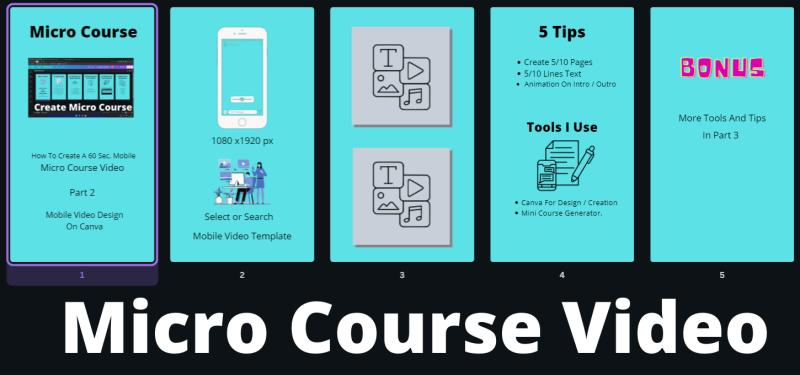
Part 2 How To Create Mobile Micro Course Video.
Part 3 Create Mobile Micro Course, 5 Part / 5 Min Videos.
Part 4:
Why Create Mini Courses To Share Online And For Marketing.
- Market Your Biz
- Brand Yourself And Biz
- Show Expertise
- Create Trust
- Show Course Value
- Share/Sell Your Course Over And Over Again.
- Helps To Achieve Goals.
- Encourage Community Engagement
- Creating mini courses helps you build trust and show your expertise in your field while also bringing people together.
- When learners connect with each other during the course, they share valuable insights and stories, making the experience richer for everyone.
- This kind of interaction can lead to lasting friendships, networking opportunities, and even exciting future projects.
- A lively community boosts your reach, encouraging members to tell others about their experiences, which helps your course have a lasting impact well beyond the original group of students.
Part 5:
Tools for Creating, Managing, and Sharing Online Mini Courses.
Here are the tools I use to easily learn, create, manage, and share online mini courses.
- Free Blog: This is a great way to outline, manage, and share your mini courses in an easy-to-use format.
- Canva: I use this tool to make eye-catching videos for my mobile micro courses.
- Screenshot and the screen recorder are essential for producing quality course content.
- Social Media Platforms: Are great for building your audience and sharing short video introductions to your courses and links.
- Tool for email marketing that helps you connect with your audience and share course updates on time.